Hook: The Smile Trap
At the end of a training session, you hand out feedback forms. Participants rate the content, the trainer, and the snacks. Most tick “Excellent.” You smile, collect the papers, and think, “Job well done.”
But weeks later, when performance doesn’t improve and behaviors stay the same, you start to wonder — what went wrong?
Welcome to the era of “Happy Sheets and Designing for Impact” — the Level 1 evaluation trap that makes trainers feel successful but leaves organizations with little measurable impact.
Phase 1: Understanding the “Happy Sheet” Illusion
“Happy Sheets” — or Level 1 evaluations — measure participant satisfaction. They ask if learners liked the session, if the trainer was engaging, or if the venue was comfortable. While these questions matter for logistics and morale, they barely scratch the surface of learning effectiveness and provides a scope to promote designing for impact.
For years, corporate trainers have equated high satisfaction scores with success. The problem?
A participant can enjoy the session without learning anything — and can learn something valuable even without enjoying the session.
This illusion has created a culture where trainers are rated by smiles, not by skills.
The goal now is clear: we must move from smiles to shifts — from temporary satisfaction to sustained performance change by incorporating designing for impact.
Phase 2: Redefining What “Impact” Really Means
To design for impact, trainers need to define what impact looks like.
Impact isn’t about whether learners felt good; it’s about whether they did good afterward.
True learning designing by impact shows up in:
- Behavioral changes at the workplace
- Improved metrics (sales, service scores, productivity, safety incidents, etc.)
- Increased confidence and capability among employees
- Business outcomes that align with strategic goals
When you align your training objectives with business KPIs simply by designing for impact, your programs move from “nice-to-have” to “mission-critical.”
Phase 3: Designing for Impact Backward — Start with the End in Mind
Many trainers start with content: slides, activities, games.
But impactful learning starts backward — with the end result.
Use Backward Design to reframe your approach:
- Identify the desired results: What should learners be doing differently after training?
- Determine acceptable evidence: How will you measure that change (observation, metrics, assessments)?
- Plan learning experiences: Design sessions, simulations, and reflections that lead to those outcomes.
When training is designed backward, every slide, story, and exercise serves a measurable purpose.
Phase 4: The Kirkpatrick Connection — From Level 1 to Level 4
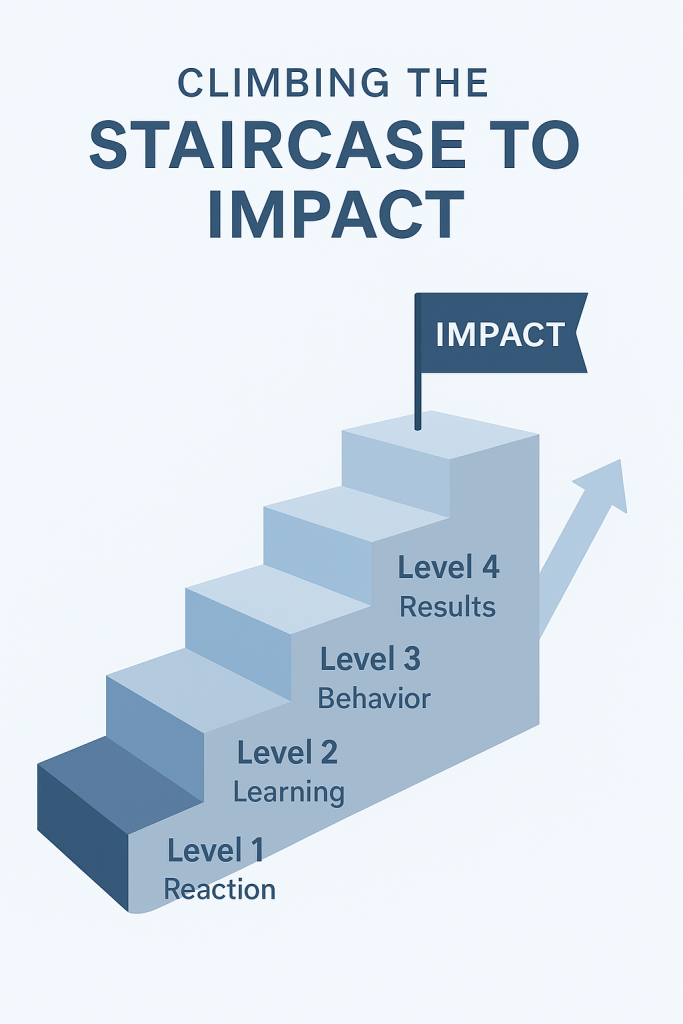
Donald Kirkpatrick’s Four Levels of Evaluation remain a gold standard. But most organizations never move beyond Level 1 and 2. Let’s revisit what each level means — and how to progress:
| Level | Focus | Key Question | Example |
|---|---|---|---|
| Level 1 | Reaction | Did learners like it? | Happy Sheet feedback |
| Level 2 | Learning | Did they learn it? | Pre/post tests, quizzes |
| Level 3 | Behavior | Did they apply it? | On-the-job observation |
| Level 4 | Results | Did it impact the business? | Performance metrics |
To move beyond Level 1:
- Build Level 2 tools into your session (knowledge checks, gamified assessments).
- Partner with managers to track Level 3 (observe changes in performance).
- Link results with HR or business KPIs to demonstrate Level 4 outcomes.
Impact isn’t proven in the classroom — it’s proven in the workplace.
Phase 5: The Power of Pre– and Post-Design
Impactful training starts before and continues after the session.
Before training:
- Conduct a Training Needs Analysis (TNA) to find root causes.
- Align learning goals with business pain points.
- Set clear performance objectives (“After training, employees should be able to handle X within Y time”). This is one of the major benefits when you are designing for impact.
After training:
- Share micro-reminders or job aids.
- Ask managers to reinforce key behaviors.
- Measure retention and application after 30, 60, or 90 days.
This turns training from an event into a process — and that’s where true transformation happens.
Phase 6: Case Study — The Call Center That Stopped Chasing Smiles
A multinational call center conducted monthly communication skills training. Feedback averaged 4.8/5 — excellent.
But customer satisfaction scores remained flat.
After revisiting their design, the L&D team redefined success:
They measured the number of calls resolved without escalation as their performance metric.
They redesigned the training to include live call simulations, post-training coaching, and manager feedback loops.
Within two months, escalation rates dropped by 22%, and customer satisfaction rose by 15%. That’s the power of designing for impacts.
The team still collected feedback — but this time, they measured behavioral shifts, not just emotional reactions.
That’s what designing for impact looks like.
Phase 7: Measuring What Matters
If you want to demonstrate impact:
- Define measurable goals before training.
- Collect multi-source feedback (from learners, peers, and managers).
- Use performance dashboards to visualize improvements.
- Report insights, not opinions.
Replace “Participants loved it” with “Service resolution improved by 18% within 60 days.”
That’s the language leadership understands — and funds.
Phase 8: The Trainer’s Mindset Shift
Moving beyond happy sheets requires courage.
It’s easier to design for applause than accountability.
But the modern trainer isn’t an entertainer — they’re a performance partner.
When you start designing for impact, not approval, you elevate both your programs and your profession.
Closing Thought
Next time you distribute feedback forms, pause for a moment.
Ask yourself: Am I collecting smiles or creating shifts?
Because great trainers don’t just make learners happy —
They make them effective.