
There is a moment in almost every training session when you can feel it. Attention drops. Energy flattens. Participation becomes polite rather than real.
It does not happen because learners are unwilling. It happens because attention, by design, is limited — and most training sessions are not designed to restore it. This is the central challenge of learner engagement in training: not holding attention forever, but designing sessions that renew it.
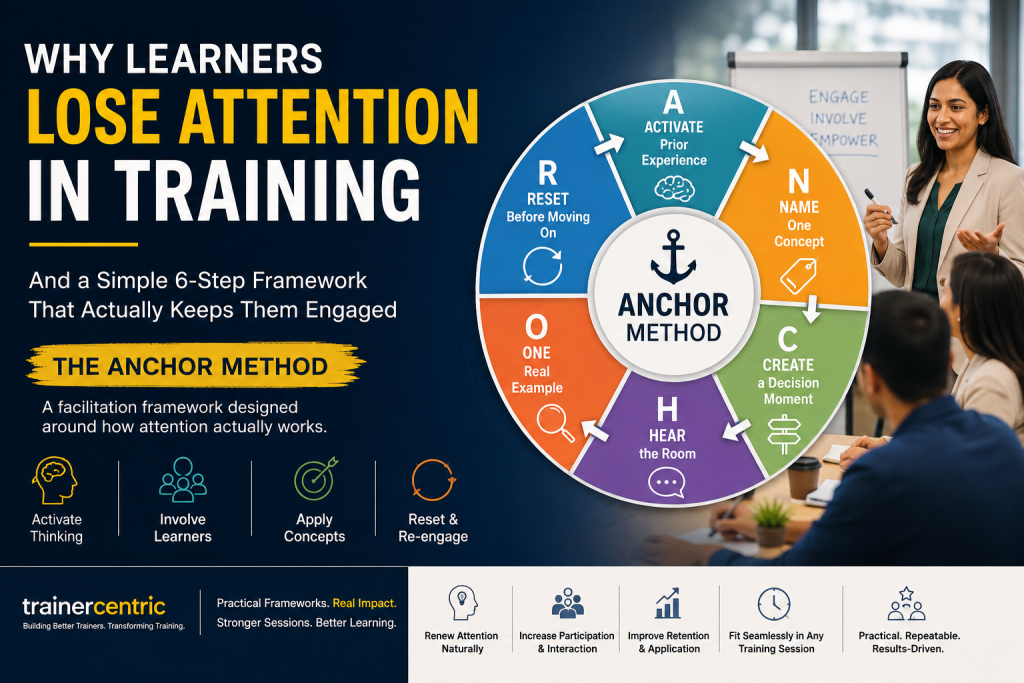
The ANCHOR Method is a facilitation framework built to do exactly that. In this article, we’ll walk you through each phase of the method, show you how to apply it in a real 90-minute session, and explain the science behind why it works.
Why Learner Engagement in Training Breaks Down
Learner engagement in training refers to the level of attention, participation, and cognitive involvement learners maintain throughout a session. High engagement occurs when learners are actively thinking, making decisions, and applying concepts—not just listening. But before we look at the solution, we need to understand the failure points — not theoretically, but practically.
1. Cognitive Overload
Too much information. Too quickly delivered. With no time to process. Learners are not disengaged — they are saturated.
2. Passive Delivery
Listening is not learning. When learners only receive information, their role is reduced to observation — not participation.
3. No Decision-Making Moments
Most sessions prioritize explanation over application. But learning does not deepen when people simply understand something. It deepens when they are forced to use judgment.
4. Poor Session Structure
Content flows continuously, without rhythm. There are no intentional pauses, no resets, no transitions that help the brain separate one idea from another.
The result? Even strong content fails — not because it lacks value, but because it lacks design for attention.
The Problem with Most Training Design
Most training sessions are built around one assumption: “If I explain it clearly enough, learners will stay engaged.”
They won’t. Because engagement is not a function of clarity alone — it is a function of cognitive involvement over time. What is missing is not better content. What is missing is a repeatable structure that tells trainers:
- When to introduce new ideas
- When to pause
- When to involve learners
- When to consolidate learning
Without that structure, even experienced trainers rely on instinct. And instinct does not scale. This is where the ANCHOR Method comes in.
What Is the ANCHOR Method? A 6-Phase Learner Engagement Framework
The ANCHOR Method is a facilitation design framework built on a simple principle: learner attention follows a predictable cycle. If you design your session around that cycle, engagement sustains.
It is not a script. It is a rhythm. Each letter stands for a distinct phase — a shift in how learners engage with the content.
A — Activate Prior Experience
Before introducing new content, connect it to something learners already know. A single question is enough:
“Think of a time when this situation came up in your work. What did you do?”
Why this works:
The brain retains new information more effectively when it can attach to an existing memory. Activation creates that entry point.
N — Name One Concept
Introduce one idea. Clearly. With a name. Not multiple ideas — just one.
“The concept we’re working with here is called the Attention Window — the 8–12 minute span in which focused engagement can be sustained.”
Why this works:
Named concepts are easier to recall. The name becomes a mental shortcut that learners carry out of the room.
C — Create a Decision Moment
After introducing the idea, stop explaining. Instead, ask learners to apply it.
“You have a 90-minute session. Where would you place your first processing moment?”
Why this works:
Decision-making activates judgment — not just memory. It shifts learners from passive understanding to active thinking. This is one of the most powerful learner engagement techniques available to a facilitator.
H — Hear the Room
Bring responses into the shared space. Surface thinking. Highlight patterns.
“I’m hearing a few of you say you would introduce interaction after 20 minutes. That’s interesting — let’s look at what that means in practice.”
Why this works:
When learners see their thinking acknowledged, engagement increases. Their contribution becomes part of the learning — not just the facilitator’s content.
O — One Real Example
Ground the concept in reality. Not a perfect-case scenario — a real one that reflects the challenges your learners actually face.
Why this works:
Abstract ideas are fragile. Concrete, recognizable examples are what make concepts memorable and transferable.
R — Reset Before Moving On
Before introducing the next concept, create a brief, intentional pause.
“Take 30 seconds. What is one thing from this section that you will actually use?”
Why this works:
Without separation, ideas blur in working memory. A reset creates cognitive clarity and prepares the brain for the next cycle.
How to Apply the ANCHOR Method in a 90-Minute Training Session
Here is what a full ANCHOR cycle looks like in a real session structure:
0–10 min — Activate
- Ask participants to reflect on a relevant past challenge
- Invite quick sharing (paired or open group)
10–20 min — Name
- Introduce one concept with a clear, memorable name
- Example: “The Attention Window”
20–30 min — Create
- Pose a decision-based question
- Ask learners to apply the concept to a scenario
30–40 min — Hear
- Bring responses into discussion
- Highlight patterns and surface contrasting perspectives
40–55 min — One Example
- Walk through a real-world scenario
- Show how the concept plays out under realistic conditions
55–60 min — Reset
- Short individual reflection or pair discussion
- “What will you actually use from this?”
Then repeat the cycle for the next concept.
What changes? Learners stay cognitively involved. Energy remains dynamic. Retention improves — not because the content changed, but because the structure did.
IIf you would like to know more about content designing and how instructional designing can help you achieve creating a better content that keeps the learners engaged, here is a free ebook that you can download from Trainercentric.
5 Common Mistakes That Break Learner Engagement in Training
Even experienced trainers fall into these traps when designing sessions:
1. Rushing the Activation Phase
Jumping straight into content without context means learners struggle to connect the new information to anything meaningful.
2. Introducing Too Many Concepts at Once
Trying to “cover more” results in nothing sticking. One concept, one cycle, one step at a time.
3. Skipping the “Hear” Phase
Discussion takes time — but skipping it removes learners from active contribution and breaks the engagement loop.
4. Using Generic Examples
Examples that don’t reflect real work situations produce low relevance and low retention. The more specific, the better.
5. Treating Reset as Optional
Especially under time pressure, the reset phase gets cut. The result: cognitive overload accumulates across the session.
The Science Behind the ANCHOR Method
The ANCHOR framework is not theory layered onto practice — it is practice aligned with how the brain learns.
Attention Cycles
Research consistently shows that focused attention operates in short bursts of 8–12 minutes. Designing around this prevents cognitive fatigue and keeps learners mentally present across longer sessions.
Cognitive Load Management
By limiting concepts and spacing them out deliberately, the ANCHOR Method reduces the risk of cognitive overload — one of the primary causes of disengagement in training.
Retrieval and Application
Decision moments (the ‘Create’ phase) force retrieval and active use — both of which are critical for long-term retention. This is sometimes called the ‘testing effect’ in learning science.
Social Learning Dynamics
Hearing others’ thinking in the ‘Hear’ phase reinforces individual understanding and creates collective meaning — a principle grounded in social constructivist learning theory.
How to Start Using the ANCHOR Method Immediately
You do not need to redesign your entire training program. Start with one session:
- Take a session you already run
- Break it into 2–3 concept blocks
- Apply the ANCHOR cycle to each block
- Add at least one decision moment per concept
- Build in a reset before moving on to the next idea
Even this one shift will change how your sessions feel — and more importantly, how they are experienced by your learners.
Want to go deeper?
If you found the ANCHOR Method useful, explore these TrainerCentric resources:
- Train the Trainer Program — Build structured facilitation skills with expert guidance
- Practice Lab — Test your delivery and get real feedback in a safe environment
- Custom Content — Get training materials designed around your specific learner needs
- TrainerCentric Magazine — Monthly insights for L&D professionals who want to stay ahead
Final Thought
The goal of training is not to deliver content. It is to sustain thinking.
Frameworks like the ANCHOR Method are not about controlling a room. They are about designing for attention — intentionally and repeatedly — so that learning has the space to happen.
When attention is sustained, learning follows.
Frequently Asked Questions About the ANCHOR Method
What is the ANCHOR Method in training?
The ANCHOR Method is a facilitation framework designed to maintain learner engagement by structuring training sessions around how human attention naturally works. Each letter — Activate, Name, Create, Hear, One Example, Reset — represents a phase in a repeatable engagement cycle.
How is the ANCHOR Method different from other facilitation frameworks?
Unlike models focused on content delivery (such as ADDIE or the Kirkpatrick Model), the ANCHOR Method focuses specifically on in-session learner engagement. It gives facilitators a repeatable rhythm to follow — one that prevents cognitive overload and keeps participation active throughout the session.
Can the ANCHOR Method be used in virtual training?
Yes. Each phase of ANCHOR adapts to virtual settings. The ‘Activate’ phase can use polls or chat prompts, ‘Hear’ can use breakout rooms, and ‘Create’ can use collaborative whiteboards. The structure is format-agnostic — what changes is the tool, not the principle.
How long does one ANCHOR cycle take?
A single ANCHOR cycle typically takes 20–30 minutes, depending on session depth. In a 90-minute training session, you can complete two to three full cycles — one per major concept.
Who can use the ANCHOR Method?
The ANCHOR Method is designed for corporate trainers, L&D professionals, instructional designers, and facilitators who lead live training sessions — whether in-person, virtual, or hybrid. It is equally useful for experienced trainers refining their approach and new trainers building their facilitation toolkit.
Where can I practice using the ANCHOR Method?
TrainerCentric’s Practice Lab offers a structured environment to test your facilitation approach and receive expert feedback on your delivery — including how well you are applying engagement techniques like ANCHOR.

![The Power of Storytelling in Corporate Training: Igniting Success and Inspiring Growth [2023]](https://trainercentric.com/wp-content/uploads/2023/06/storytelling-1024x576.jpg)